How do I hide private details in a Mac screenshot before I share it?
Cover anything private with a solid box before the image leaves your Mac, and check the whole frame, not only the part you meant to show. Snapshot, a Mac app from Faraday Soft that is free during early access, finds names, emails, phone numbers, card numbers, addresses, IP addresses and API keys in a capture and covers them. The capture and the redaction stay on your Mac.
Step by step
Snapshot needs macOS 15 or later and is notarized by Apple.
- Download Snapshot from faradaysoft.com and open it.
- Allow Screen Recording when macOS asks. macOS requires it before any app can read pixels from your screen. Snapshot uses those pixels only for the capture you request, and the permission stays under System Settings → Privacy & Security.
- Take the screenshot. Grab a window, a selected area or a full display, with a global shortcut or a 3, 5 or 10 second delay. For a long page, build a scrolling screenshot.
- Redact. Let Snapshot find and cover emails, phone numbers, cards, addresses, IP addresses and keys in the capture.
- Read what's left. Cover anything else by hand with shapes or blur, and add arrows, text or numbered steps to point at what matters.
- Share it. Copy or save the image. Save an editable project if you may want to change the annotations later.
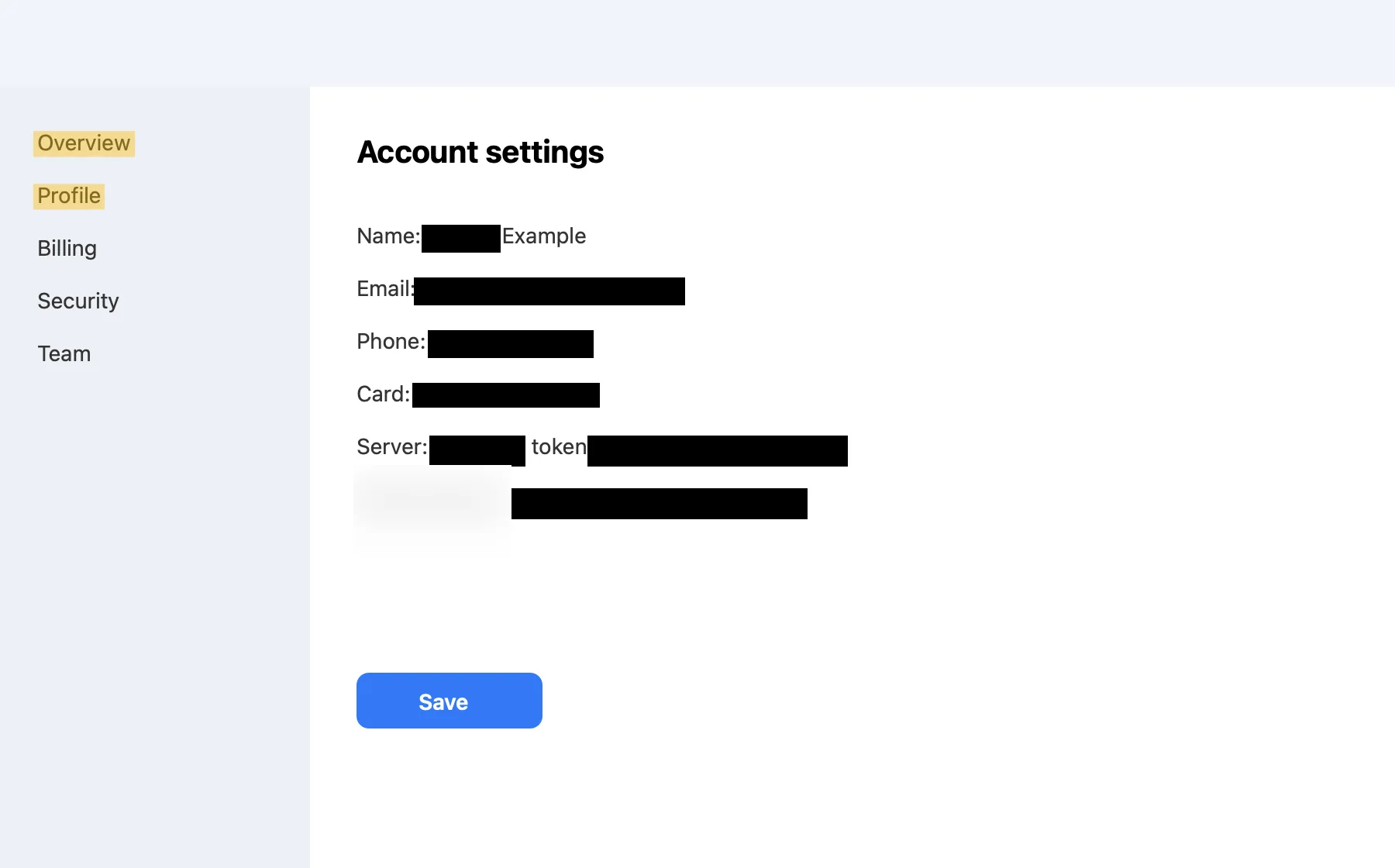
Redaction on a sample page
What to check before you share any screenshot
Most leaks in screenshots aren't in the part you meant to show. They're at the edges. Run through this list whatever tool you use.
- The edges. Browser tabs, the bookmarks bar, the menu bar, notifications that slid in, and file names on the desktop.
- Text that looks harmless. A web address with a token in it, an email address in a reply header, an IP address in a terminal, a customer name in a sidebar.
- Crop before you cover. If part of the screen isn't needed, cut it out rather than hiding it.
- Use a solid cover for secrets. A light blur over short text, like a password or key, can sometimes be read back. A solid box leaves nothing to read.
- Look again at full size. Small text that's hard to see in a thumbnail is easy to read once someone zooms in.
Nothing from your captures. Screenshots, recordings, recognized text and projects stay on your Mac, and Faraday Soft doesn't receive them. The app makes no background network requests. Check for Updates reads a small version file from faradaysoft.com only when you choose it. See the Snapshot privacy policy.
Questions
What can Snapshot find and cover for me?
Names, emails, phone numbers, card numbers, addresses, IP addresses and API keys in a capture.
Why does Snapshot need Screen Recording permission?
macOS requires it before any app can read pixels from your screen. Snapshot uses those pixels only to make the capture you requested. The permission stays under System Settings → Privacy & Security.
Does Snapshot upload my screenshots?
No. Captures, recordings, recognized text and editable projects stay on your Mac. There is no account, analytics, advertising, telemetry or third-party SDK.
Does it cost anything?
Not yet. Snapshot is free while it is in early access. A paid version is coming, and early users will get a founder discount on it.
Get Snapshot.
Free during early access. macOS 15 or later, Apple-notarized.
See every device on your Wi-Fi from an iPhone
Scan the network you're on, find out what each device is, and see what it has open.
Recon · iPhone · iPad ·
Make a calendar event ring like an alarm on iPhone
Turn the meetings that matter into real alarms that ring through silent mode and Focus.
Klaxon · iPhone · iPad ·